Secret References in Elsa 3.8

Workflow engines have an awkward relationship with secrets.
Workflows need credentials all the time: API keys, bearer tokens, connection strings, private keys, passwords, webhook secrets. But workflow definitions are also something people edit, export, import, version, inspect, and sometimes log by mistake.
If the answer is "just paste the token into the activity input", the system will eventually disappoint you.
Elsa 3.8 preview 1 adds a first-party Elsa.Secrets module and a matching Studio UI. The important change is not just that Elsa can store named values. It is that workflow definitions can refer to secrets without storing the secret value as ordinary workflow data.
That gives the product a proper boundary for secret-aware authoring and runtime resolution.
More than a name/value bag
A secret in Elsa has a logical identity and lifecycle. The model includes fields such as:
- name and display name
- description
- type
- store
- optional scope
- tags
- status
- current version
- timestamps and expiration
The technical name is the stable reference used by workflows. The current value can rotate behind that reference.
That distinction is the whole point. A workflow should be able to say "use crm:token" without embedding the actual token into workflow JSON. When the token rotates, future resolutions should use the new active version without editing the workflow definition.
Stores and types
The module has a few important contracts:
ISecretManagerhandles create, get, update, rotate, revoke, delete, and test operations.ISecretResolverresolves the latest active value by name.ISecretStoreandISecretStoreRegistryprovide pluggable storage backends.ISecretTypeRegistrydescribes supported secret types.ISecretRepositorystores secret metadata and versions.
Elsa 3.8 includes an Elsa-managed encrypted store and a configuration-backed read-only store.
The encrypted store uses data protection and is the default writable store. The configuration-backed store maps configuration keys to secret values and cannot be written through the API.
That split is useful in real hosts. Some secrets should be managed by Elsa. Others already come from environment variables, Kubernetes secrets, Azure Key Vault-backed configuration, Docker secrets, or another host-level provider. The configuration store lets Elsa reference those values without pretending Studio owns them.
The management surface
The Core API lives under the normal Elsa API prefix:
GET    /elsa/api/secrets
GET    /elsa/api/secrets/{name}
POST   /elsa/api/secrets
POST   /elsa/api/secrets/{name}
DELETE /elsa/api/secrets/{name}
POST   /elsa/api/secrets/{name}/rotate
POST   /elsa/api/secrets/{name}/revoke
POST   /elsa/api/secrets/{name}/test
POST   /elsa/api/secrets/picker
GET    /elsa/api/secrets/descriptors
The permissions are split by operation:
read:secrets
write:secrets
delete:secrets
test:secrets
The test operation is worth calling out. It resolves the secret and reports whether resolution succeeded. It does not need to turn Studio into a place where the secret value is displayed.
That is a small but important design point.
The Studio experience
Studio adds the Secrets page under:
/security/secrets
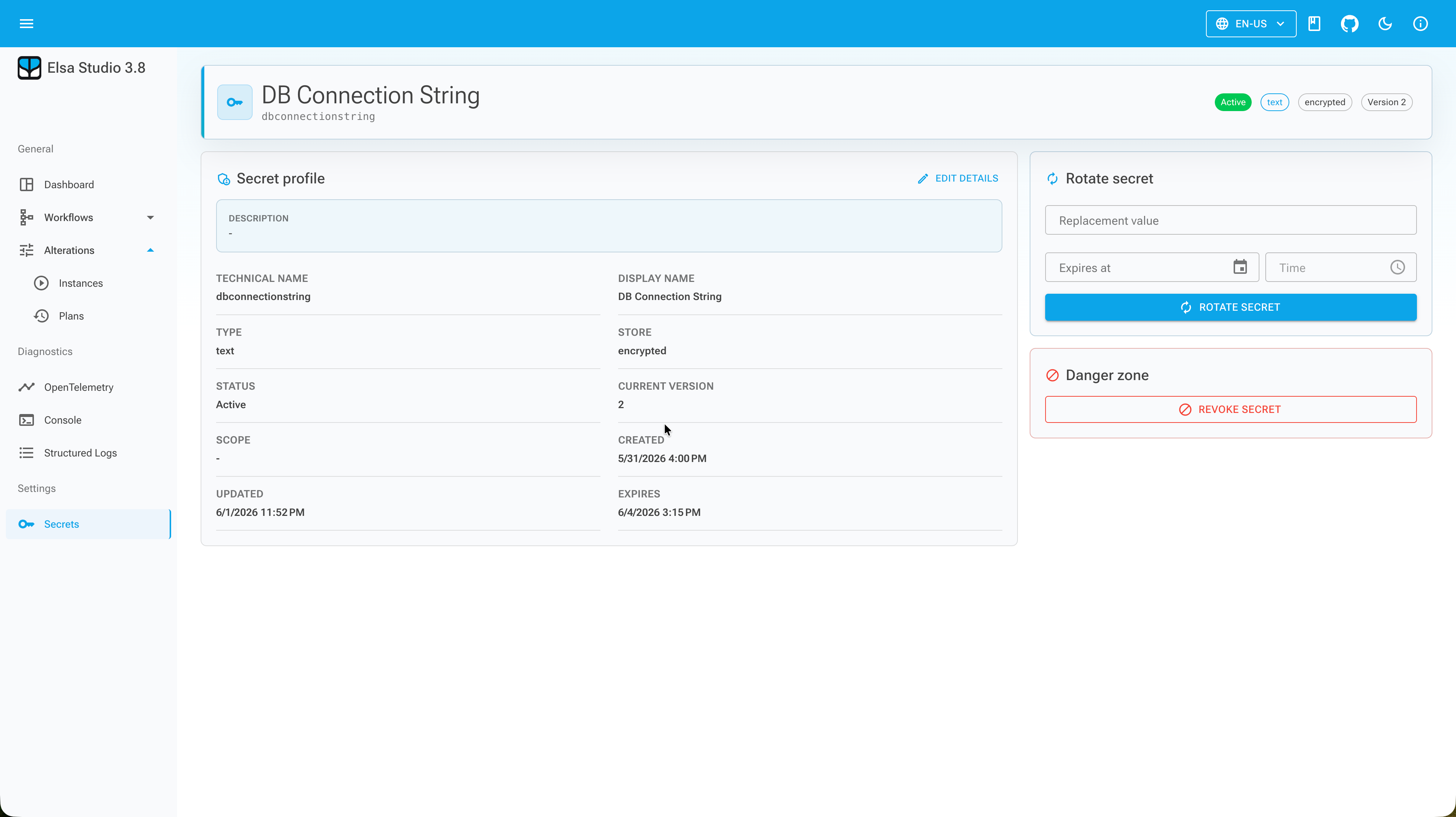
From there you can search, create, open details, update metadata, rotate, test, revoke, and delete secrets.
The more interesting part for workflow authors is the secret picker UI hint. Inputs that can contain secrets can render a picker instead of a plain text box. The picker stores a Secret expression reference instead of the current secret value.
For simple no-code binding, that is the path I expect most users to take.
Instead of pasting a bearer token into an HTTP activity input, the activity input can hold a secret reference. At runtime, the expression resolves through ISecretResolver and returns the latest active value.
Secret expressions and JavaScript
The Secret expression is the direct workflow binding mechanism. A reference can include the secret name and optional type or scope constraints. If a text token reference points at an RSA key, or a production-scoped reference points at a development secret, resolution should fail.
Failures for missing, expired, revoked, or incompatible secrets are reported as non-secret error messages. The system should not leak the secret value while telling you what went wrong.
For scripts, Elsa.Secrets.JavaScript adds:
const token = await getSecret("crm:token");
return `Bearer ${token}`;
getSecret(name) returns a Promise<string>, so JavaScript needs to await it or compose it with .then(...).
This is useful when a script has to combine a secret with runtime data. It should not become a habit of resolving secrets and then writing them into variables, outputs, logs, incident messages, or activity state.
Use the Secret expression for simple binding. Use getSecret when the script genuinely needs to compute something around the value.
Sensitive inputs still matter
Secret references reduce the need to store credential values in workflow definitions, but they do not remove the need to mark sensitive inputs correctly.
Elsa's guidance is that activity inputs capable of carrying credentials should set CanContainSecrets = true. Sensitive activity inputs should not be written to activity state after evaluation.
That matters for custom activities. If an activity accepts a connection string, API key, password, authorization header, or similar value, treating it as an ordinary string input is not good enough. The designer experience, persistence behavior, and runtime diagnostics all need to understand that the field can contain sensitive data.
The secrets module gives Elsa a native contract for this. It does not magically fix every custom activity.
Preview foundation
I would treat this as an important foundation rather than the final word on enterprise secret management.
The useful thing in 3.8 is that Elsa now has a product-level model for named secrets, secret references, stores, versioning, rotation, revocation, testing, picker integration, and runtime resolution.
That gives us a clean place to integrate more stores and policies over time.
More importantly, it gives workflow authors a better default than pasting credentials into activity inputs.
That alone is worth doing.
Originally published at https://www.elsaworkflows.io/blog/secret-references-in-elsa-3-8.